Ergonomic laptop stands solve one problem: raising your screen to eye level so your neck stops doing all the work. After comparing 15 popular options, the Nulaxy Ergonomic Adjustable Laptop Stand stands out as the best overall pick thanks to its wide height range, stable dual-hinge design, and effective heat ventilation. The Lamicall Aluminum Laptop Stand is the better choice if you want a rock-solid fixed-height riser that never wobbles, while the Amazon Basics Ergonomic Laptop Stand delivers the best budget value for under twenty dollars. The main tradeoff in this category is between full adjustability, which lets you fine-tune screen height and angle, and single-position stability, which suits a permanent desk setup. Portability, swivel bases, and wrist supports further split the field. Keep reading for the full breakdown of all 15 stands and which one fits your desk, your laptop, and your posture goals.

Get health and wellness essentials delivered free with Prime
- Fast, free delivery on millions of items
- Prime Video, Amazon Music and more included
- Member-only deals all year
Key Takeaways
- Adjustable stands (Nulaxy, Tounee, LOXP) beat fixed-height risers for ergonomics because proper screen height varies with your chair, desk, and body — a one-position stand only fits some setups.
- Swivel bases (Tounee, Uncaged Ergonomics, Nulaxy 360°) add real value for shared desks and client-facing work, but they introduce slight wobble that pure fixed stands like the Lamicall and Besign avoid.
- The LOXP family appears three times in this lineup, and its wrist-support models trade portability for comfort — a meaningful pick if you type directly on your laptop keyboard rather than using an external one.
- Budget metal risers under $20 (Amazon Basics, generic adjustable models) matched premium stands on raw lifting ability but cut corners on hinge tightness, meaning they can slowly sink under heavier 16-inch laptops.
- True ergonomics requires an external keyboard and mouse with any of these stands — every riser here raises the screen but makes the built-in keyboard worse to type on, so plan your full setup accordingly.
| Tounee Telescopic Laptop Stand with 360° Swivel Base |  | Best for Sit-Stand Desks | Height Range: 2.1″ to 21″ | Maximum Support Weight: 22 lbs | Rotation: 360° swivel base | VIEW LATEST PRICE | See Our Full Breakdown |
| JCZT Clear Acrylic Laptop Stand with Wrist Rest |  | Best Minimalist Pick | Material: Clear acrylic | Height: 2.7 inches fixed | Compatibility: Laptops up to 17 inches | VIEW LATEST PRICE | See Our Full Breakdown |
| LOXP Adjustable and Foldable Laptop Stand |  | Best for Travel | Material: Sturdy metal | Max Load: 15.4 lbs (7 kg) | Supported Laptop Size: Up to 15.6 inches | VIEW LATEST PRICE | See Our Full Breakdown |
| Adjustable and Foldable Metal Laptop Riser (Silver) |  | Best Value | Support Weight: 17.6 lbs (8 kg) | Material: ABS, aluminum, silicone | Supported Devices: Laptops 10-15.6″, tablets, books | VIEW LATEST PRICE | See Our Full Breakdown |
| Lifelong Aluminum Adjustable Laptop Stand, 20″ Riser | 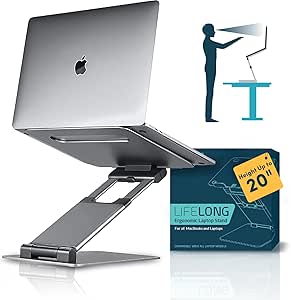 | Best for Tall Workstations | Material: Aluminum | Maximum Height: 20 inches | Arm Extension: 13 inches | VIEW LATEST PRICE | See Our Full Breakdown |
| Lamicall Aluminum Laptop Stand for Desk for MacBook Air Pro Neo 10-17.3” |  | Best for Wide Compatibility | Compatibility: Laptops 10″ to 17.3″ (MacBook, Surface, Dell XPS, HP, ASUS, Acer, Chromebook, Alienware) | Material: Aluminum alloy | Dimensions: 12 x 10 x 2 inches | VIEW LATEST PRICE | See Our Full Breakdown |
| Laptop Stand for Desk (360° Rotating), Aluminum Laptop Riser for 10-16 Inch Laptops | 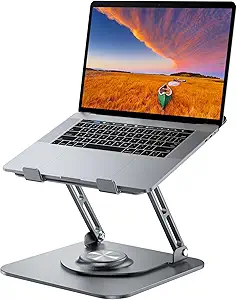 | Best for Collaboration and Screen Sharing | Material: Aluminum alloy | Compatibility: Laptops 10-16 inches | Max Load: 11 lbs | VIEW LATEST PRICE | See Our Full Breakdown |
| Nulaxy Ergonomic Adjustable Laptop Stand for Desk, Dual Foldable Computer Riser with Heat-Vent |  | Best Value for Ergonomic Fundamentals | Compatibility: 10-16 inch laptops | Material: Metal with silicone pads | Weight: 1.7 pounds | VIEW LATEST PRICE | See Our Full Breakdown |
| LOXP Laptop Stand for Desk, Aluminum Laptop Riser Holder with Wrist Support |  | Best for Typing Comfort | Compatibility: 9.3-17.3 inch laptops (MacBook Air/Pro, Lenovo, Dell, Asus, HP, Chromebook, Samsung) | Material: Aluminum alloy, anodized finish | Elevation: Fixed 2.6-inch height | VIEW LATEST PRICE | See Our Full Breakdown |
| Adjustable Laptop Stand for Desk, Metal Laptop Riser Holder |  | Best Budget Portable Pick | Compatibility: Laptops 10-15.6 inches | Material: Metal | Weight: 780 g | VIEW LATEST PRICE | See Our Full Breakdown |
| Nulaxy 360° Rotating Ergonomic Laptop Stand for Desk, Dual Foldable Design |  | Best for Screen Sharing | Rotation: 360° | Load Capacity: 22 lbs | Foldable: Yes | VIEW LATEST PRICE | See Our Full Breakdown |
| Amazon Basics Sturdy and Portable Ergonomic Laptop Stand for Desk, Height Adjustable Riser with Ventilated Cooling, Foldable, Fits all Laptops up to 15.6 Inch, Silver |  | Best Budget Pick | Material: Lightweight, rust-resistant aluminum | Height Adjustment: Up to 7 inches | Supported Devices: Laptops and tablets 10-15.6 inches | VIEW LATEST PRICE | See Our Full Breakdown |
| Uncaged Ergonomics Swivel Laptop Stand for Desk, 360 Riser, Arctic Silver |  | Best for Adjustability Seekers | Dimensions: 10.56 x 8.25 x 7.5 inches | Material: Metal | Compatible Devices: Laptops and tablets 10-15.6 inches | VIEW LATEST PRICE | See Our Full Breakdown |
| LOXP Adjustable Laptop Stand with 360° Rotating Base |  | Best for 16-Inch Laptops | Material: Fiber metal | Supported Laptop Size: 10-16 inches | Dimensions: 12.21 x 12.61 x 2.76 inches | VIEW LATEST PRICE | See Our Full Breakdown |
| Besign LS03 Aluminum Laptop Stand, Ergonomic Detachable Computer Stand for 10-15.6″ Laptops, Silver |  | Best Stability for the Money | Compatibility: 10-15.6 inch laptops | Material: Aluminum alloy | Maximum Support Weight: 8.8 lbs (4 kg) | VIEW LATEST PRICE | See Our Full Breakdown |
| ergonomic laptop stand | Material | Compatibility |
|---|---|---|
| Tounee Telescopic Laptop Stand | Aluminum alloy | Laptops 10-17 inches |
| JCZT Clear Acrylic Laptop Stan | Clear acrylic | Laptops up to 17 inches |
| LOXP Adjustable and Foldable L | Sturdy metal | MacBook, Dell XPS, HP, ASUS, Lenovo, Acer, Chromebook, Surface (10-15.6") |
| Adjustable and Foldable Metal | ABS, aluminum, silicone | — |
| Lifelong Aluminum Adjustable L | Aluminum | Laptops 10-17 inches |
| Lamicall Aluminum Laptop Stand | Aluminum alloy | Laptops 10" to 17.3" (MacBook, Surface, Dell XPS, HP, ASUS, Acer, Chromebook, Alienware) |
| Laptop Stand for Desk | Aluminum alloy | Laptops 10-16 inches |
| Nulaxy Ergonomic Adjustable La | Metal with silicone pads | 10-16 inch laptops |
| LOXP Laptop Stand for Desk | Aluminum alloy, anodized finish | 9.3-17.3 inch laptops (MacBook Air/Pro, Lenovo, Dell, Asus, HP, Chromebook, Samsung) |
| Adjustable Laptop Stand for De | Metal | Laptops 10-15.6 inches |
| Nulaxy 360° Rotating Ergonomic | — | — |
| Amazon Basics Sturdy and Porta | Lightweight, rust-resistant aluminum | — |
| Uncaged Ergonomics Swivel Lapt | Metal | — |
| LOXP Adjustable Laptop Stand w | Fiber metal | — |
| Besign LS03 Aluminum Laptop St | Aluminum alloy | 10-15.6 inch laptops |
More Details on Our Top Picks
Tounee Telescopic Laptop Stand with 360° Swivel Base
This option stands out for its 21-inch maximum height, which puts it in rare territory among the stands here — most rivals like the LOXP riser top out well below desk-to-eye sitting range. If the goal is alternating between sitting and standing without buying a full standing desk, this is the pick that makes the most sense. The 360° swivel base also adds a collaboration angle the fixed-height JCZT acrylic stand simply can’t match. Compared with the Lifelong 20-inch riser, the Tounee feels more stable at full extension thanks to its 22 lb rating, though neither is wobble-free at maximum height. The tradeoff is footprint: the base needs real estate to rotate safely, and on a shallow desk the swivel becomes a hazard rather than a feature.
Pros:- Exceptional 2.1″ to 21″ height range covers both sitting and standing use
- 360° swivel base makes screen sharing easy
- Supports a hefty 22 lbs including heavier 17-inch machines
- Folds down for transport despite the tall reach
Cons:- Large footprint that crowds small desks
- Needs clearance for full rotation
- Only available in gray
Best for: Remote workers who alternate between sitting and standing and want desk-height flexibility without a standing desk
Not ideal for: Anyone with a shallow or cramped desk — the swivel base and full-height extension demand serious surface area
- Height Range:2.1″ to 21″
- Maximum Support Weight:22 lbs
- Rotation:360° swivel base
- Material:Aluminum alloy
- Compatibility:Laptops 10-17 inches
- Portability:Compact and foldable
Our verdict“Buy this if you want genuine sit-stand ergonomics from a single stand; skip it if your desk is small.”
JCZT Clear Acrylic Laptop Stand with Wrist Rest
Where nearly everything in this roundup folds, telescopes, or pivots, the JCZT does one thing: it lifts your laptop 2.7 inches and looks good doing it. The clear acrylic disappears visually on a desk, which buyers who care about aesthetics will appreciate far more than another silver aluminum Z-frame. The integrated wrist rest is a genuine differentiator — the LOXP wrist-support stand offers something similar, but at a fixed ergonomic height this one keeps typing posture comfortable without an angle adjustment. That fixed height is also the main drawback: unlike the LOXP adjustable riser or the Tounee telescopic stand, there’s no way to tune the elevation, so the ergonomics are take-it-or-leave-it. Tool-free assembly takes minutes, and rubber pads keep everything planted.
Pros:- Clear acrylic design blends into any desk aesthetic
- Built-in wrist rest reduces strain during long typing sessions
- Tool-free assembly in minutes
- Rubber pads prevent slipping and desk scratches
Cons:- No height or angle adjustment at all
- May not accommodate very thick or large laptops despite the 17-inch rating
Best for: Style-conscious buyers with a dedicated desk setup who want clean aesthetics plus wrist comfort at one proven height
Not ideal for: Anyone who needs to fine-tune screen height or alternate between sitting and standing — the 2.7-inch lift is non-negotiable
- Material:Clear acrylic
- Height:2.7 inches fixed
- Compatibility:Laptops up to 17 inches
- Assembly:Tool-free
- Features:Integrated wrist rest, rubber pads
- Color:Clear
Our verdict“The right choice for a fixed, beautiful desk setup; the wrong one if adjustability matters to you.”
LOXP Adjustable and Foldable Laptop Stand
Compared with bulkier options like the Tounee telescopic stand, the LOXP folds down small enough to live in a laptop bag, which is the whole reason to choose it. The adjustable height and angle give it real ergonomic range that fixed risers like the JCZT acrylic stand can’t offer, and the open-frame design delivers effective heat dissipation — a meaningful benefit for thin laptops that throttle under load. The catch is capacity: it caps out at 15.6 inches and 15.4 lbs, so 16- and 17-inch workstation machines are off the menu, where the Tounee and Lifelong stands both welcome them. Non-slip pads keep it steady on hotel desks and café tables alike. For frequent travelers with standard-sized laptops, this tradeoff is easy to accept; for desktop-replacement owners, it isn’t.
Pros:- Folds compactly for genuine travel portability
- Height and angle adjustability in a lightweight frame
- Open ventilation design keeps laptops cool
- Non-slip pads stabilize the stand on any surface
Cons:- Limited to laptops 15.6 inches and under
- 15.4 lb load cap excludes heavier machines
Best for: Commuters and frequent travelers carrying 13-15.6 inch laptops who want ergonomic adjustability on the road
Not ideal for: Owners of 16-17 inch gaming or workstation laptops — the size and 15.4 lb limits rule them out
- Material:Sturdy metal
- Max Load:15.4 lbs (7 kg)
- Supported Laptop Size:Up to 15.6 inches
- Foldable:Yes
- Heat Dissipation:Enhanced ventilation design
- Compatibility:MacBook, Dell XPS, HP, ASUS, Lenovo, Acer, Chromebook, Surface (10-15.6″)
Our verdict“The clear choice for road warriors with standard laptops; larger devices need a bigger stand.”
Adjustable and Foldable Metal Laptop Riser (Silver)
This is the budget-conscious pick that still covers the ergonomic basics: adjustable height and angle, a ventilated metal deck, and an 17.6 lb load rating that actually beats the pricier-feeling LOXP travel stand. Where the JCZT gives you one fixed height and the Tounee charges a premium for tall-reach telescoping, this riser splits the difference — enough adjustability to relieve neck strain, enough foldability to move between rooms, and a price that’s easy to justify. It even doubles as a stand for tablets and books, which none of the laptop-only options here do. The drawbacks are real, though: silicone-padded aluminum feels less premium than the Lifelong’s all-aluminum build, the 10-15.6 inch size limit excludes large machines, and silver is your only color choice.
Pros:- Height and angle adjustments at a budget-friendly price
- 17.6 lb capacity exceeds some costlier rivals
- Ventilation holes keep laptops running cool
- Doubles as a tablet and book stand
Cons:- Capped at 15.6-inch laptops
- Build materials feel less refined than all-aluminum alternatives
- Only available in silver
Best for: Students and first-time buyers who want core ergonomic adjustability without spending much
Not ideal for: Owners of 17-inch laptops or anyone wanting a premium look and finish
- Support Weight:17.6 lbs (8 kg)
- Material:ABS, aluminum, silicone
- Supported Devices:Laptops 10-15.6″, tablets, books
- Adjustable:Yes (height and angle)
- Foldable:Yes
- Cooling:Ventilated deck
- Color:Silver
Our verdict“The smart money pick for anyone who needs adjustability, not luxury.”
Lifelong Aluminum Adjustable Laptop Stand, 20″ Riser
The Lifelong occupies interesting middle ground: like the Tounee telescopic stand it reaches 20 inches tall for standing work, but it does so with a simpler articulating-arm design and an all-aluminum build that feels cleaner on a desk. The 20 adjustable arm lengths let you dial in exact height and depth positions — more granular than the single-column telescoping approach, though at the cost of some rigidity. Compared with the Tounee’s 22 lb rating, this stand is less confident under heavy 17-inch gaming laptops at full extension, so it’s better matched to ultrabooks and MacBooks. It also handles every laptop size from 10 to 17 inches, unlike the LOXP or the budget metal riser. Aesthetically it leans utilitarian; buyers wanting something that disappears like the JCZT acrylic stand should look elsewhere.
Pros:- 20-inch reach supports standing work
- 20 adjustable arm lengths for precise positioning
- Fits every laptop size from 10 to 17 inches
- Foldable aluminum construction travels well
Cons:- Less stable under heavy laptops at full extension
- Utilitarian design won’t suit style-focused setups
- No extra features beyond height and arm adjustment
Best for: Standing-desk users with lightweight 10-17 inch laptops who want precise height and arm positioning
Not ideal for: Owners of heavy gaming or workstation laptops — stability at full 20-inch extension is questionable
- Material:Aluminum
- Maximum Height:20 inches
- Arm Extension:13 inches
- Adjustable Arm Lengths:20 positions
- Compatibility:Laptops 10-17 inches
- Portability:Foldable
Our verdict“A strong standing-height option for lighter laptops if the Tounee’s footprint or price doesn’t fit.”
Lamicall Aluminum Laptop Stand for Desk for MacBook Air Pro Neo 10-17.3”
The Lamicall Aluminum Laptop Stand stands out for its unusually broad size range — it handles everything from a 10-inch tablet-class device up to a 17.3-inch gaming laptop, which immediately separates it from picks like the Nulaxy Ergonomic Adjustable Stand that tops out at 16 inches. That range matters because most households juggle multiple devices, and a single stand that fits a MacBook Air today and a big Dell XPS tomorrow saves you from buying twice. The ventilated aluminum base doubles as a passive heatsink, a real benefit for thermally throttled machines. The tradeoff is subtlety of adjustment: compared with the 360° rotating model from the same roundup, this stand offers fewer positioning degrees of freedom, and the silver-only finish won’t match darker setups.
Pros:- Fits laptops from 10 to 17.3 inches — one of the widest ranges available
- Stable, heavy-duty aluminum base resists wobble on busy desks
- Ventilation holes plus aluminum construction improve heat dissipation
- Folds flat enough to slip into a bag for office-to-home moves
Cons:- Height and angle adjustment is more basic than dual-rod or swivel designs
- Only available in silver, which clashes with black or dark workstations
- Featherweight frame may flex under heavier 17-inch machines
Best for: Households or shared desks where laptops range from small ultrabooks to 17-inch machines and one stand needs to fit them all
Not ideal for: Buyers who want maximum ergonomic fine-tuning — height and angle adjustment here is more limited than on swivel-base competitors
- Compatibility:Laptops 10″ to 17.3″ (MacBook, Surface, Dell XPS, HP, ASUS, Acer, Chromebook, Alienware)
- Material:Aluminum alloy
- Dimensions:12 x 10 x 2 inches
- Weight:0.06 kg
- Mounting Type:Tabletop
- Features:Adjustable, ergonomic, foldable, portable
- Color:Silver
Our verdict“This is the stand to buy when one desk serves several differently-sized laptops and universal fit matters more than precise adjustability.”
Laptop Stand for Desk (360° Rotating), Aluminum Laptop Riser for 10-16 Inch Laptops
What makes this 360° rotating riser worth a slot is the swivel base — a feature most stands in this roundup, including the Lamicall Aluminum Stand, simply don’t offer. If your workday involves turning your screen toward a colleague, a client across the table, or a second monitor position, the rotation eliminates the awkward laptop-shuffle entirely. The 11.81-inch maximum height is generous, letting taller users get closer to true eye-level than shorter fixed-riser options like the LOXP wrist-support model. The catch: the heavy rotating base that makes it stable also makes it bulkier, and the 10-16 inch size limit excludes 17-inch gaming or workstation laptops that the Lamicall handles without complaint.
Pros:- Full 360° swivel makes screen sharing and pairing sessions effortless
- Height extends to 11.81 inches — strong eye-level elevation for tall users
- Heavy base keeps everything planted even when spun
- Folds down to 9.45 x 9.45 x 1.25 inches for travel
Cons:- Capped at 16-inch laptops — no support for large gaming or workstation machines
- Rotating base takes up more desk space than fixed designs
- Open swivel mechanism adds moving parts that fixed stands don’t have
Best for: Office workers and consultants who frequently share their screen with people sitting beside or across from them
Not ideal for: Owners of 17-inch laptops or anyone with a cramped desk — the rotating base demands real estate most compact setups can’t spare
- Material:Aluminum alloy
- Compatibility:Laptops 10-16 inches
- Max Load:11 lbs
- Adjustable Height:Up to 11.81 inches
- Folded Dimensions:9.45 x 9.45 x 1.25 inches
- Rotation:360°
Our verdict“The right pick if collaboration drives your workflow — nobody else in this lineup spins like it does.”
Nulaxy Ergonomic Adjustable Laptop Stand for Desk, Dual Foldable Computer Riser with Heat-Vent
The Nulaxy dual-foldable stand earns its place by doing the core ergonomic job — raising a screen toward eye level — at a price that undercuts more specialized picks like the 360° rotating riser while offering something that model doesn’t: a dual-rod support structure rated for 22 lbs, nearly double the load. That headroom means a 16-inch laptop sits rock-solid with no flex, which matters if you type firmly or use a heavier machine. The silicone-padded contact points also protect laptop finishes better than bare metal edges. Compared with the Lamicall, its size limit is stricter at 16 inches, and its folded footprint is a bit bulkier at 11.81 x 11.02 inches — this is a desk-first stand that travels only occasionally, not a daily commuter.
Pros:- Dual-rod frame holds up to 22 lbs with minimal wobble
- Genuine eye-level elevation reduces neck and shoulder strain
- Heat-vent design keeps airflow moving under the chassis
- Silicone pads grip the laptop and prevent scratches
Cons:- Limited to 16-inch laptops — no large-machine support
- Height adjustment range is narrower than taller telescopic stands
- Setup and folding mechanism takes a few uses to get smooth
Best for: Students and home-office workers on a budget who need reliable height elevation and sturdy support for a 13-16 inch laptop
Not ideal for: Frequent travelers who pack a stand daily — the folded profile is noticeably chunkier than slim single-hinge designs
- Compatibility:10-16 inch laptops
- Material:Metal with silicone pads
- Weight:1.7 pounds
- Dimensions:11.81 x 11.02 x 2.76 inches
- Load Capacity:Up to 22 lbs
- Features:Adjustable, ergonomic, foldable, heat-vent, portable
Our verdict“The sensible default choice when you want proven ergonomic elevation and tank-like stability without paying for features you won’t use.”
LOXP Laptop Stand for Desk, Aluminum Laptop Riser Holder with Wrist Support
Most laptop stands solve the neck problem by creating a wrist problem — raising the screen means typing on an angled keyboard. The LOXP stand with wrist support is the rare model that addresses both, pairing a modest 2.6-inch elevation with an integrated padded palm rest. That low-lift philosophy puts it in direct contrast with the Nulaxy dual-rod riser, which pushes screens toward eye level but leaves your wrists unsupported at a steeper angle. The open-frame design claiming up to 90% airflow also out-ventilates most enclosed competitors, and the screw-free, tool-free assembly comes apart for travel. The honest tradeoff: if your priority is maximum screen height for posture correction, this stand’s deliberate low profile will undershoot — it’s built for typists, not for eye-level purists.
Pros:- Integrated wrist support relieves typing pressure — almost unique in this category
- Open frame allows roughly 90% airflow for superior cooling
- Triangle-stability engineering with rubber pads keeps laptops planted
- Tool-free assembly and disassembly make it genuinely travel-ready
Cons:- Fixed 2.6-inch height offers little flexibility for different users or chairs
- Not ideal as a standing-desk companion given the low elevation
- Detachable design means occasional reassembly when moving between locations
Best for: Writers, programmers, and anyone who types for hours directly on the laptop keyboard and needs wrist relief alongside mild elevation
Not ideal for: Buyers chasing maximum eye-level height for posture correction — the fixed 2.6-inch lift falls short of what taller adjustable stands deliver
- Compatibility:9.3-17.3 inch laptops (MacBook Air/Pro, Lenovo, Dell, Asus, HP, Chromebook, Samsung)
- Material:Aluminum alloy, anodized finish
- Elevation:Fixed 2.6-inch height
- Weight:0.49 kg
- Mounting Type:Tabletop suspended bracket
- Features:Wrist support, ventilated open frame, detachable, portable
- Color:Black
- Warranty:3 years
Our verdict“The standout choice for keyboard-heavy workers who refuse to trade neck relief for wrist pain.”
Adjustable Laptop Stand for Desk, Metal Laptop Riser Holder
This adjustable metal riser plays the value card: it delivers height and angle adjustment, a 17.6 lb load rating, and ventilation at a price that undercuts the Nulaxy while folding smaller than most competitors in this lineup. For a first ergonomic upgrade — the moment you realize your neck hurts after a workday — it covers the basics without asking much. Compared with the Lamicall, the tradeoff is capacity: this stand stops at 15.6-inch laptops, so 16- and 17-inch machines are off the table. The metal build is genuinely sturdy for the weight class, but the rubber contact mats are the weak point — expect them to wear and lose grip before the frame itself shows any age.
Pros:- Adjustable height and angle at one of the lowest price points in the category
- Solid 17.6 lb load capacity despite the light 780 g frame
- Ventilation holes keep laptops running cooler during long sessions
- Folds compactly for commutes and occasional travel
Cons:- Hard 15.6-inch size ceiling excludes most gaming and creator laptops
- Rubber mats degrade with use, reducing grip over time
- Adjustment mechanism feels less precise than premium aluminum stands
Best for: First-time buyers and students who want an entry-level ergonomic lift for a 13-15.6 inch laptop without spending much
Not ideal for: Owners of 16-inch-plus laptops or anyone wanting a stand that stays pristine — the size cap and wearing rubber pads limit longevity
- Compatibility:Laptops 10-15.6 inches
- Material:Metal
- Weight:780 g
- Load Capacity:17.6 lbs (8 kg)
- Dimensions:2.36 x 1.57 x 1.57 inches (folded)
- Features:Adjustable, ergonomic, foldable, portable
Our verdict“A smart low-risk first stand for smaller laptops — just don’t expect it to carry a big machine or last through years of daily folding.”
Nulaxy 360° Rotating Ergonomic Laptop Stand for Desk, Dual Foldable Design
360° rotation is the whole story here, and it’s the feature that separates this Nulaxy from fixed-deck options like the Besign LS03. If your workday involves turning your screen toward a colleague, client, or family member across the table, a rotating base saves you the awkward laptop shuffle — something the Besign simply can’t do. The 22 lb load capacity is also the highest in this batch, so bulky 17-inch gaming or workstation laptops sit safely where the Amazon Basics stand (11 lbs) would feel marginal. Height and angle adjustment round out a genuinely ergonomic package.
The tradeoff is transparency: material specifications are vague, which makes durability harder to judge than the clearly labeled aluminum Besign. Very heavy laptops can also introduce wobble at the rotating joint, so this isn’t the pick for rock-solid typing stability.
Pros:- 360° rotating base makes screen sharing effortless
- 22 lb weight capacity handles heavy gaming and workstation laptops
- Height and angle adjustability supports proper ergonomic positioning
- Dual foldable design packs down for travel
Cons:- Material details are unspecified, making durability hard to assess
- Rotating joint can introduce wobble with very heavy or uneven laptops
Best for: Office workers and hybrid meeting-takers who constantly swivel their screen to share with others, especially with heavier laptops
Not ideal for: Buyers who prioritize typing rigidity or want documented material quality — the rotation mechanism adds a potential wobble point
- Rotation:360°
- Load Capacity:22 lbs
- Foldable:Yes
- Adjustability:Height and angle adjustable
- Design:Dual foldable
- Intended Use:Home, office, and travel
Our verdict“Buy this if constant screen-turning is part of your workflow and your laptop is too heavy for lighter-duty stands.”
Amazon Basics Sturdy and Portable Ergonomic Laptop Stand for Desk, Height Adjustable Riser with Ventilated Cooling, Foldable, Fits all Laptops up to 15.6 Inch, Silver
This is the no-nonsense value option in the lineup. For roughly the price of lunch, you get the core ergonomic essentials — up to 7 inches of height adjustment, a ventilated aluminum deck, and a fold-flat frame — without paying for extras like the 360° rotation on the Nulaxy or Uncaged stands, which many buyers will rarely use. Compared with the similarly sized Besign LS03, it actually offers more height range and folds smaller (10 x 8.7 x 1.8 inches), making it the better travel companion.
The savings show in the limits, though. The 11 lb capacity and 15.6-inch size cap mean 16-inch MacBook Pros and gaming laptops are off the menu — the LOXP 360° stand handles those. It also demands a flat, solid surface; on a wobbly café table, the lightweight frame becomes a liability rather than an asset.
Pros:- Up to 7 inches of height adjustment for genuine ergonomic benefit
- Ventilated aluminum deck helps passive cooling
- Folds flat and weighs only 1.7 lbs for travel
- Non-slip pads keep the setup steady on solid desks
Cons:- 15.6-inch size limit and 11 lb capacity exclude larger laptops
- Lightweight frame needs a flat, stable surface to avoid balance issues
Best for: Students and budget-conscious remote workers with standard 13-15 inch laptops who want real ergonomic adjustment cheaply
Not ideal for: Owners of 16-inch or heavier laptops — the 15.6-inch size limit and 11 lb capacity rule them out
- Material:Lightweight, rust-resistant aluminum
- Height Adjustment:Up to 7 inches
- Supported Devices:Laptops and tablets 10-15.6 inches
- Weight Capacity:11 lbs (5 kg)
- Folded Size:10 x 8.7 x 1.8 inches
- Weight:1.7 lbs (0.77 kg)
Our verdict“The smartest spend if you want adjustable height and cooling on a tight budget and your laptop is 15.6 inches or smaller.”
Uncaged Ergonomics Swivel Laptop Stand for Desk, 360 Riser, Arctic Silver
Where the Amazon Basics stand gives you height and the Nulaxy 360° gives you rotation, this Uncaged model combines rotation, height, and tilt adjustment in one frame — the most complete adjustment toolkit among the 360° options here. That trio matters ergonomically: tilt is what lets you fix glare and get the screen angle right for your eye line, not just its height. The vented metal deck keeps thermals in check during long sessions, and the foldable frame travels reasonably well at just over 10 inches wide.
Two caveats temper the enthusiasm. There’s no stated weight capacity, so heavier 16-inch machines are a gamble — the Nulaxy’s documented 22 lb rating makes it the safer heavy-laptop choice. And the one-year warranty is thinner coverage than you’d want on a stand with multiple moving parts, which is exactly where failures tend to appear.
Pros:- Independent height, tilt, and 360° rotation adjustment
- Vented deck supports passive cooling
- Foldable metal construction suits travel
- Clean Arctic Silver finish fits modern workspaces
Cons:- No published weight capacity creates uncertainty for heavier laptops
- One-year warranty is short for a multi-joint mechanism
Best for: Ergonomics-focused desk workers who want to fine-tune height, tilt, and screen direction independently
Not ideal for: Owners of heavier or 16-inch+ laptops — with no published weight capacity, stability is unverified
- Dimensions:10.56 x 8.25 x 7.5 inches
- Material:Metal
- Compatible Devices:Laptops and tablets 10-15.6 inches
- Rotation:360 degrees
- Adjustments:Height and tilt adjustable
- Foldable:Yes
- Warranty:1 year
Our verdict“The pick for buyers who want maximum fine-tuning control, provided their laptop is a standard 10-15.6 inch model.”
LOXP Adjustable Laptop Stand with 360° Rotating Base
Most stands in this roundup tap out at 15.6 inches, which quietly excludes a huge chunk of modern laptops. This LOXP model supports machines up to 16 inches, and its fiber metal construction feels more substantial than the lightweight Amazon Basics aluminum — that heft translates into stability when a big laptop sits on an elevated, rotated deck. Like the Nulaxy 360°, it offers full rotation plus height and angle adjustment, but its larger footprint gives bigger machines more secure footing.
The flip side of that sturdiness is weight: at 1.53 kg, it’s noticeably heavier than the 1.7 lb Amazon Basics stand, so daily commuters will feel it in a bag. It’s also capped at 16 inches, so 17.3-inch gaming rigs (better served by the Lamicall in this guide) still don’t fit. Aesthetes should note the limited color options.
Pros:- Supports laptops up to 16 inches, larger than most stands in this guide
- Fiber metal build delivers solid stability for bigger machines
- 360° rotation plus height and angle adjustment
- Foldable despite the sturdy construction
Cons:- At 1.53 kg, it’s heavier than competing portable stands
- Still capped at 16 inches, excluding 17-inch laptops
Best for: Owners of 16-inch MacBook Pros or similarly sized laptops who need a stable, rotating desktop riser
Not ideal for: Daily commuters and travelers — at 1.53 kg it’s one of the heavier portable options here
- Material:Fiber metal
- Supported Laptop Size:10-16 inches
- Dimensions:12.21 x 12.61 x 2.76 inches
- Weight:1.53 kg
- Rotation:360°
- Adjustability:Height and angle adjustable
- Mounting Type:Tabletop
Our verdict“The logical choice for 16-inch laptop owners who want rotation and stability, as long as it mostly lives on one desk.”
Besign LS03 Aluminum Laptop Stand, Ergonomic Detachable Computer Stand for 10-15.6″ Laptops, Silver
If your priority is a rock-steady desk setup rather than bells and whistles, the LS03 makes the most sense. Unlike the rotating stands from Nulaxy and LOXP, this is a fixed, detachable aluminum riser — no swivel joint means no wobble, and the one-piece aluminum alloy deck keeps even a 15-inch laptop planted while typing. The 5.7-inch elevation hits the ergonomic sweet spot for most seated desks, and the open-frame design doubles as passive ventilation.
Compare it with the Amazon Basics stand and the differences are clear: less height range, but a more rigid, premium-feeling structure that doesn’t depend on a perfectly flat surface. The limitations are real, though — 8.8 lbs maximum is the lowest capacity in this batch, so heavier workstations should step up to the Nulaxy, and the rubber grips can wear down over years of daily repositioning.
Pros:- Fixed aluminum frame delivers excellent typing stability with no wobble
- Elevation up to 5.7 inches improves posture and reduces neck strain
- Open design provides good ventilation
- Detachable and folds flat for storage
Cons:- 8.8 lb weight capacity is the lowest among these stands
- Rubber grips may wear down over long-term use
Best for: Desk-based workers with standard 13-15 inch laptops who value typing stability over adjustability tricks
Not ideal for: Owners of heavy gaming or workstation laptops — the 8.8 lb capacity is the lowest in this roundup
- Compatibility:10-15.6 inch laptops
- Material:Aluminum alloy
- Maximum Support Weight:8.8 lbs (4 kg)
- Elevation Range:Up to 5.7 inches (14.5 cm)
- Design:Detachable, folds flat
- Color:Silver
Our verdict“The dependable set-and-forget riser for standard laptops, as long as your machine isn’t a heavyweight.”

How We Picked
I evaluated each stand against five buyer-relevant criteria. Adjustability came first: a stand that raises your screen to eye height across different chairs and desks is the whole point of an ergonomic purchase, so models with wide height and angle ranges ranked higher than single-position risers. Stability mattered equally — a stand that wobbles or slowly sinks under a 16-inch laptop fails at its basic job, so hinge quality and base construction were weighted heavily. Build quality and materials separated the aluminum picks from the plasticky budget risers, since a stand is something you touch and lean on every day.
Beyond the core trio, I scored portability for buyers who move between home and office, rewarding foldable designs that collapse flat, and value, which measures performance against price rather than just hunting for the cheapest option. Extras like 360° swivel bases, wrist rests, and ventilated cooling counted as genuine differentiators only when they solved a real problem, not as checkbox features. The ranking logic is simple: stands that best combine eye-level adjustability with day-to-day stability rose to the top, while fixed-height and budget models earned lower but still defined roles for specific buyer types.
Factors to Consider When Choosing Ergonomic Laptop Stands
Choosing an ergonomic laptop stand comes down to more than picking the tallest or cheapest riser. These are the factors that actually determine whether a stand improves your posture or becomes an expensive paperweight.Height Range and Your Actual Eye Level
The single most common mistake buyers make is choosing a stand without measuring their setup first. Proper ergonomics puts the top of your screen at or slightly below eye level, and that height depends on your seat height, desk height, and torso length — which is why a fixed-height stand is a gamble. If you already know your target height, a fixed riser like the Lamicall or Besign can work perfectly and save money. If you share a desk, switch between sitting and standing, or have never measured, an adjustable model like the Nulaxy or Tounee removes the guesswork. A useful trick: stack books under your laptop for a week and note the height that feels right before buying anything. Also remember that raising the screen makes the built-in keyboard unusable at a healthy angle, so budget for an external keyboard and mouse as part of the true cost of ergonomic computing.
Stability and Laptop Weight
A stand’s stability depends on three things: the base footprint, hinge tightness, and how much laptop it’s holding. A 12-inch MacBook Air is forgiving; a 16-inch gaming or workstation laptop stresses every hinge and can cause cheap adjustable stands to creep downward over weeks of use. Heavier laptops generally do better on fixed or single-hinge designs, where there are fewer moving parts to fail. Swivel bases add another variable — they are genuinely useful for turning your screen toward a colleague or a second seating position, but they introduce a rotating joint that adds a small amount of play. Read stability complaints in reviews specifically from owners of your laptop size, not laptop owners in general. And if you type directly on the laptop keyboard with any force, prioritize front-edge support and rubber padding, because keyboard bounce is the most annoying daily failure mode of flimsy stands.
Portability: Where Will You Actually Use It?
Be honest about whether this stand lives on one desk or travels with you. A full-size adjustable riser like the Lifelong 20-inch model is excellent at home but adds serious bulk to a backpack, and many buyers end up leaving heavy stands behind and working hunched anyway. Frequent travelers should prioritize stands that fold flat and weigh under a pound, accepting some stability tradeoff as the cost of portability. Hybrid workers who split time between two locations often do better buying two inexpensive stands — like the Amazon Basics — than one premium model that lives in a bag. Also check folded dimensions against your actual bag, not the marketing photos, since some “portable” stands fold into awkward shapes that don’t slide into slim laptop sleeves. Portability is only a feature if you will genuinely carry it.
Materials, Cooling, and Long-Term Durability
Almost every stand here is aluminum or steel, but thickness and finish vary a lot, and that difference shows up within months. Thin aluminum flexes under pressure and can develop creaky joints, while thicker extruded aluminum holds its rigidity for years. Open-frame and ventilated designs do double duty by letting air reach your laptop’s underside, which matters for sustained workloads — a laptop thermal-throttling on a flat solid surface loses performance you already paid for. Solid acrylic designs like the JCZT look elegant on a desk but trap heat, so they suit light-workload machines better than performance laptops. Check whether rubber contact pads are replaceable or glued, because pads collect grit, harden, and are usually the first part to fail. A stand is a buy-it-for-years item, so spending ten extra dollars on better metal is usually the smarter long-term math.
Wrist Rests and Swivel Bases: Real Features or Gimmicks?
Two features in this category deserve scrutiny because they help some buyers and hurt others. Wrist rests, like those on the JCZT and LOXP models, are genuinely comfortable if you type on the laptop keyboard — but they become useless obstacles the moment you switch to an external keyboard, which is the ergonomically correct move anyway. Decide which typing style you actually have before paying extra for that feature. Swivel bases serve a narrower audience: they shine on shared desks, reception counters, and collaborative workspaces where the screen turns toward different people, and for solo users in a fixed chair they are dead weight. Neither feature improves the core ergonomic function of raising the screen, so treat both as tiebreakers between otherwise equal stands rather than reasons to buy. The best stand for you is defined by height, stability, and workflow — not by the longest feature list.
Price Tiers and When to Pay More
This category has three rough price bands, and knowing which one you belong in prevents overspending. Under $20 gets you a functional riser — the Amazon Basics tier — that is fine for a fixed desk, a lighter laptop, and a tight budget, though hinge quality is the compromise. The $25–$45 mid-band is where the best value lives, with genuinely adjustable, well-built aluminum stands like the Nulaxy and Lamicall that cover 90% of buyers’ needs. Above that, you’re paying for premium materials, specialized ergonomics like the Uncaged swivel design, or extra-large capacity for 17-inch machines. The mistake to avoid is buying cheap twice: a $15 stand that sags under your heavy laptop gets replaced within months, costing more than buying right the first time. Match the price tier to your laptop’s weight and how often you’ll adjust the stand, and you’ll land in the right band.
Frequently Asked Questions
Do I really need an external keyboard with an ergonomic laptop stand?
Yes, in almost every case. Once a stand raises your screen to eye level, the laptop’s built-in keyboard sits at an angle that forces your wrists upward, which can create wrist strain even as your neck pain improves — you fix one problem by creating another. The ergonomic gold standard is a raised screen paired with an external keyboard and mouse at elbow height. The only exception is a very low-profile stand position or a model with a built-in wrist rest, like the LOXP or JCZT, used for short typing sessions. If you type for more than a couple of hours daily, factor the cost of a cheap external keyboard into your stand budget, because the combination is what actually delivers the posture benefits you’re buying the stand for.
Are adjustable stands less stable than fixed-height stands?
Generally yes, though the gap has narrowed considerably in recent designs. Every hinge and moving joint is a potential flex point, which is why single-piece stands like the Lamicall feel rock-solid while multi-joint stands can wobble slightly when you type on the laptop keyboard. That said, well-built adjustable models like the Nulaxy use tight friction hinges and wide bases that keep movement minimal, and the flexibility is worth it for most people because ideal screen height changes with your chair and posture over time. If you use an external keyboard and never touch the laptop, even minor wobble becomes irrelevant. Choose fixed-height for maximum rigidity on a permanent desk, and adjustable if your setup varies at all.
Is a 360° swivel base worth paying extra for?
It depends entirely on how you work. A swivel base earns its price on shared desks, in meetings where you turn the screen toward colleagues, or at reception and retail counters where the laptop faces different people throughout the day. For a solo user in a fixed chair, the swivel rarely gets used, and it adds a rotating joint that can introduce slight play under heavier laptops. In this comparison, the Tounee, Uncaged Ergonomics, and Nulaxy 360° models all charge a premium for the feature, so ask yourself honestly whether you rotate your screen weekly or never. If the answer is never, the same money buys a sturdier or more adjustable non-swivel stand — which is why I don’t rank swivel models at the very top for typical home-office buyers.
Will a laptop stand help with my neck and shoulder pain?
It can, but only if the height is right and the rest of your setup cooperates. Neck pain from laptop use comes from looking downward for hours, and a stand that brings the screen to eye level directly addresses that cause — most users notice a difference within a week or two. However, if your chair is too low, your desk too high, or your screen still sits below eye level after mounting, the stand alone won’t solve the problem. That’s another argument for adjustable models like the Nulaxy or Tounee, which let you dial in the exact height rather than accepting whatever a fixed riser gives you. Pair the stand with an external keyboard, position the screen about an arm’s length away, and take regular breaks — the stand is one piece of the posture puzzle, not the whole solution.
Can these stands handle a 16- or 17-inch laptop safely?
Most can, but check two specifications before buying: the maximum laptop size rating and the weight limit, because larger screens usually mean heavier machines that stress the hinges. The Tounee and Lifelong models are rated for 17-inch laptops and have the sturdier frames to match, while some compact folding stands technically fit a 16-inch chassis but flex or slowly sink under heavier machines over time. Watch for reviews mentioning height creep — stands that slowly lower themselves under load — which is the classic failure of an under-built hinge meeting an oversized laptop. Also verify the support arms don’t block any ports or the exhaust vents on your specific model, since wider gaming laptops sometimes overhang smaller stands. When in doubt, choose a stand rated one size larger than your laptop for a stability margin.
Conclusion
After comparing all fifteen stands, the right choice comes down to how and where you work. For best overall, the Nulaxy Ergonomic Adjustable Laptop Stand wins with its wide height range, stable dual-fold design, and effective cooling ventilation — it suits the widest range of desks, laptops, and body types. The best value pick is the Amazon Basics Ergonomic Laptop Stand, which delivers genuine height adjustability and solid ventilation at a price that leaves room in your budget for the external keyboard you’ll need. For best premium, the Uncaged Ergonomics Swivel Laptop Stand justifies its cost with a smooth 360° base and sturdy build that suits professional and shared workspaces.
For beginners setting up their first ergonomic desk, the Lamicall Aluminum Laptop Stand is the simplest path to a raised screen with zero adjustment fiddling and zero wobble. For specific needs: choose the Tounee Telescopic Stand if you have a 17-inch laptop, the LOXP with wrist support if you type directly on the laptop keyboard, the Besign LS03 if you want a detachable stand that travels flat, and the JCZT acrylic model if aesthetics on a visible desk matter as much as function. Whatever you pick, remember that the stand only delivers its posture benefits alongside an external keyboard and a screen set at eye level — buy the combination, not just the riser.