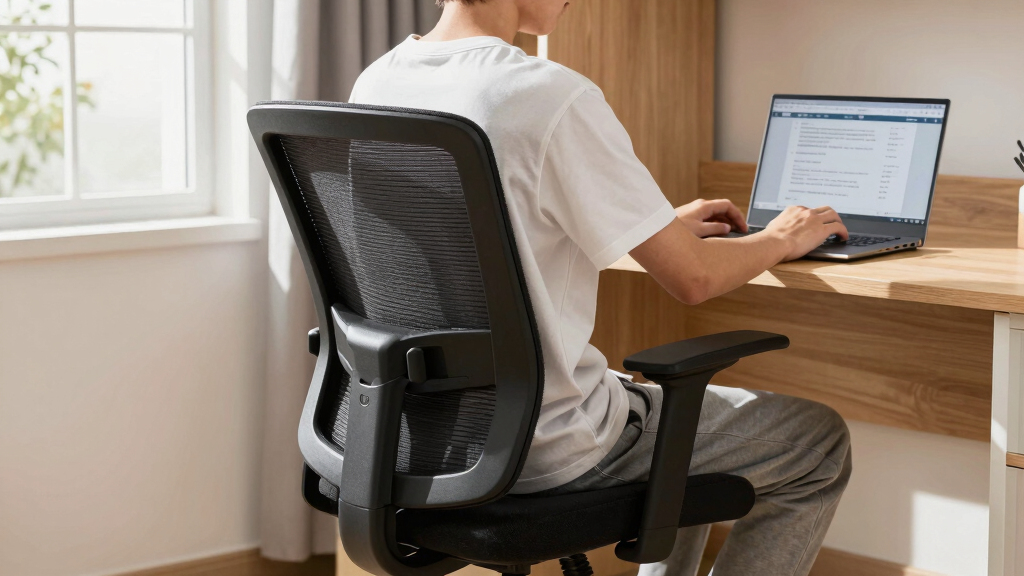

This guide helps students find and set up an ergonomic desk chair that supports proper posture and comfort for long study sessions. It covers how to evaluate features, choose the right fit, and adjust the chair correctly. Designed for beginners, expect to spend about half an hour learning how to improve your study environment.

BestOffice Ergonomic Mesh Office Chair, Mid-Back Swivel Desk Chair with Lumbar Support, Adjustable Height, Breathable Mesh Backre…
- ✔ Backrest Material: Mesh
- ✔ Seat Material: High-density sponge
- ✔ Maximum Weight Capacity: 250 lbs

NEO CHAIR Office Desk Gaming Ergonomic Computer Chair with Lumbar Support, Adjustable Height, Swivel, Mesh, Ivory
- ✔ Material: Mesh, FSC-certified wood
- ✔ Color: Ivory
- ✔ Adjustable Height: Yes
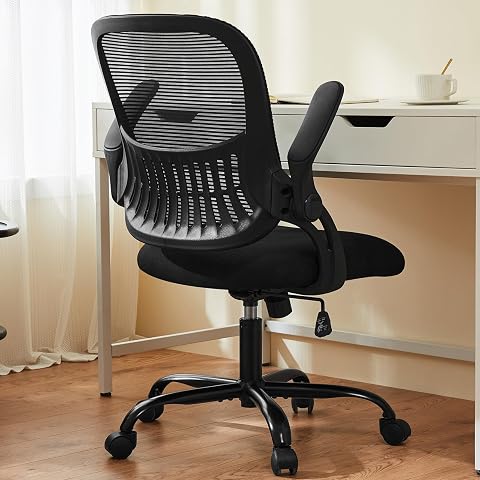
Sweetcrispy Office Computer Desk Chair, Ergonomic Mid-Back Mesh Rolling Task Chair with Lumbar Support and Flip-up Arms, Black
- ✔ Material: Mesh, Metal Frame
- ✔ Maximum Weight Capacity: 250 lbs
- ✔ Adjustable Height Range: 18.5-22.2 inches
Difficulty: Beginner | Time: 30-45 minutes
What You’ll Need
Tools & Materials:
- measuring tape
- pen and paper
Knowledge:
- basic understanding of ergonomic principles
- awareness of personal height and desk setup
Have your current chair available for comparison if possible. Know your height, arm length, and any existing discomfort during study to inform your choice.

BestOffice | Ergonomic Office Chair | Mid-Back Swivel Desk Chair | Breathable Backrest & Lumbar Support | Adjustable Height | Sponge Seat | Rolling Wheels | Dark Black | for Adults & Women
BREATHABLE MESH BACK: 100% ventilated mesh back promotes airflow to keep you cool and comfortable during long hours...
As an affiliate, we earn on qualifying purchases.
BestOffice Ergonomic Mesh Office Chair, Mid-Back Swivel Desk Chair with Lumbar Support, Adjustable Height, Breathable Mesh Backre…
This model stands out for its breathable mesh backrest and adjustable features, making it ideal for students who need reliable support without overspending. Compared with the others, it offers a mid-back design that supports good posture but may fall short for taller users needing full back support. The easy assembly and support for up to 250 lbs make it durable for most students. However, its limited color options and potential performance issues on thick carpets are tradeoffs that might matter for some.
Pros:
- Breathable mesh backrest promotes airflow
- Adjustable height and tilt tension
- Supports up to 250 lbs with durable materials
- Easy to assemble
Cons:
- Limited color options
- Mid-back may not support taller users’ full back
- Casters may not perform well on thick carpets
Best for: Students seeking a reliable, affordable ergonomic chair with breathable support
Not ideal for: Taller users needing full back coverage or students with thick carpeted rooms
Bottom line: A solid, budget-friendly choice that balances comfort and support for most students.
“A solid, budget-friendly choice that balances comfort and support for most students.”

NEO CHAIR Office Desk Gaming Ergonomic Computer Chair with Lumbar Back Support Adjustable Height Swivel Rolling Wheels Flip-up Arms Mesh Chair for Home Vanity (Ivory)
Breathable Mesh & Back Support – Elastic mesh keeps air flowing and offers gentle support, while the contoured...
As an affiliate, we earn on qualifying purchases.
NEO CHAIR Office Desk Gaming Ergonomic Computer Chair with Lumbar Support, Adjustable Height, Swivel, Mesh, Ivory
The NEO CHAIR excels for students who value space-saving features like flip-up arms and a sleek design. Its breathable mesh back ensures airflow, and the adjustable height and tilt create a customizable experience. Compared with the others, its durable construction and 1-year warranty add to its appeal, but the lack of specified weight capacity and limited color options make it less versatile for some users. It’s especially suited for students with limited space or those who prefer a modern aesthetic.
Pros:
- Breathable mesh back promotes airflow
- Flip-up arms for space efficiency
- Adjustable height and tilt
- Sturdy, safety-certified construction
Cons:
- No specific weight capacity info
- Limited color choices
- Potential durability concerns over long term
Best for: Students needing a stylish, space-efficient ergonomic chair for daily use
Not ideal for: Users requiring specific weight capacity info or more extensive ergonomic support
Bottom line: Ideal for students seeking a flexible, stylish, and space-conscious ergonomic chair.
“Ideal for students seeking a flexible, stylish, and space-conscious ergonomic chair.”
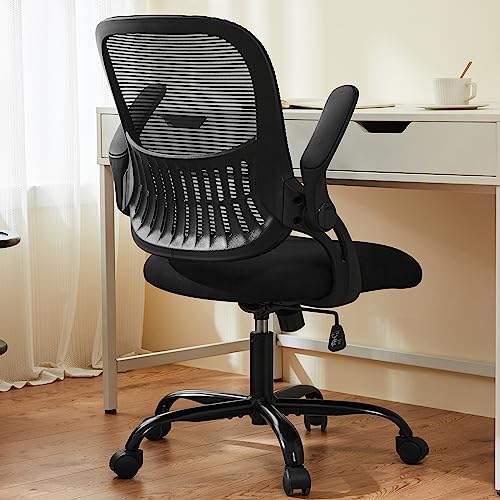
Sweetcrispy Office Computer Desk Chair, Ergonomic Mid-Back Mesh Rolling Work Swivel Task Chairs with Wheels, Comfortable Lumbar Support, Comfy Flip-up Arms for Home, Bedroom, Study, Student, Black
𝐄𝐫𝐠𝐨𝐧𝐨𝐦𝐢𝐜 𝐋𝐮𝐦𝐛𝐚𝐫 𝐒𝐮𝐩𝐩𝐨𝐫𝐭: The ergonomically designed backrest of our ergonomic office chair has prominent lumbar support to fit...
As an affiliate, we earn on qualifying purchases.
Sweetcrispy Office Computer Desk Chair, Ergonomic Mid-Back Mesh Rolling Task Chair with Lumbar Support and Flip-up Arms, Black
This mid-back mesh chair offers lumbar support and a breathable design, making it suitable for prolonged study sessions. Its flip-up armrests provide space-saving convenience, and the adjustable height along with smooth-rolling casters ensure ease of movement. Compared to the other two, its maximum weight capacity of 250 lbs is standard, but assembly might be more time-consuming. It’s a good pick for students who prioritize ergonomic support but are okay with some assembly effort.
Pros:
- Lumbar support enhances posture
- Breathable mesh back keeps you cool
- Flip-up arms save space
- Smooth casters for mobility
Cons:
- Assembly can be time-consuming
- Limited color options
- Maximum weight capacity of 250 lbs may not suit all
Best for: Students needing adjustable lumbar support and flexible armrest options
Not ideal for: Those who prefer quick assembly or require higher weight capacities
Bottom line: A versatile and ergonomic choice for students who want lumbar support and compact design.
“A versatile and ergonomic choice for students who want lumbar support and compact design.”
As an Amazon Associate we earn from qualifying purchases.
Before You Start
Ensure your study area is clear and your desk height is comfortable for writing or typing. Measure your height and arm length for personalized fit considerations. Avoid choosing a chair solely based on appearance; focus on ergonomic features and adjustability.
Step-by-Step Instructions
Step 1: Determine your ergonomic needs
Measure your height and arm length to understand what chair features will support your posture best. Write down these measurements for reference.
Tip: Use a mirror or ask someone to help for accurate measurements, especially for arm length and sitting height.
Check: You have clear measurements that match ergonomic guidelines for your body size.
Step 2: Identify key ergonomic features
Look for chairs with adjustable seat height, lumbar support, adjustable armrests, and a tilt mechanism. Prioritize these features based on your measurements and comfort needs.
Tip: Test chairs in-store or read reviews focusing on adjustability and support features.
Check: You have a list of features that meet your needs and support proper posture.
Step 3: Select a chair with proper seat height range
Choose a chair whose seat height allows your feet to rest flat on the floor and your knees to be at a 90-degree angle. Use your measurements to guide selection.
Tip: Sit on the chair and adjust the height; your thighs should be parallel to the floor, and your feet flat.
Check: You can sit comfortably with your feet flat, knees at about 90 degrees, and no pressure on your thighs.
Step 4: Ensure lumbar support aligns with your lower back
Select a chair with adjustable lumbar support that fits into the curve of your lower back when seated. Adjust the support to fill the natural lumbar curve.
Tip: Sit back fully and adjust the lumbar support until it feels snug but not tight.
Check: Your lower back is supported with no slumping or discomfort after sitting for 10 minutes.
Step 5: Adjust armrests for comfort
Set armrests so your shoulders are relaxed and arms rest comfortably with elbows at about a 90-degree angle. Adjust height and width as needed.
Tip: Remove or lower armrests if they interfere with desk clearance or cause shoulder tension.
Check: Your arms rest naturally on the armrests with relaxed shoulders and no strain.
Step 6: Test tilt and recline features
Adjust the chair’s tilt mechanism so you can lean back slightly during study breaks without losing support. Ensure it locks in desired positions.
Tip: Try different angles to find a position that relieves tension and supports your back.
Check: You can recline comfortably without feeling unstable or unsupported.
Step 7: Verify overall comfort and posture
Sit in the chair for 10-15 minutes, maintaining your typical study posture. Adjust any features further for maximum comfort and support.
Tip: Check that your head aligns with your monitor or reading material, and that your feet stay flat on the floor.
Check: You experience no strain or discomfort after extended sitting, and posture feels natural.
Common Mistakes to Avoid
- Choosing a chair based only on appearance or price — Prioritize adjustable ergonomic features over looks or cost. Test the chair’s support and adjustability first.
- Ignoring proper height and support adjustments — Spend time fine-tuning the height, lumbar support, and armrests to fit your body before using the chair regularly.
- Not testing the chair for comfort over time — Sit in the chair for at least 10 minutes and simulate typical study postures to ensure it remains comfortable.
Troubleshooting
Problem: Your feet do not rest flat on the floor after adjustment
Solution: Use a footrest or choose a chair with a higher seat range to achieve a proper foot position.
Problem: Lower back pain persists despite support
Solution: Reposition the lumbar support or add an ergonomic cushion. Ensure your posture remains upright and supported.
Problem: Armrests cause shoulder tension
Solution: Lower or remove armrests and support your arms on the desk or table instead.
What Success Looks Like
You have a chair that adjusts to your body, with proper seat height, lumbar support, armrest height, and tilt. When seated, your posture is natural, and you experience comfort during study sessions without strain.
Next Steps
Use your new ergonomic chair consistently. Periodically check and readjust to maintain comfort. Consider adding ergonomic accessories like a footrest or monitor riser if needed. Replace or upgrade the chair if discomfort persists after adjustments.
Frequently Asked Questions
How often should I readjust my ergonomic chair?
Reassess your chair’s settings whenever you change your sitting position or start experiencing discomfort. Regularly check that adjustments remain effective, especially after extended use.
Can I use a non-ergonomic chair for studying?
While possible temporarily, non-ergonomic chairs may cause discomfort or posture issues over time. Investing in an ergonomic chair promotes better health and focus during study sessions.
How long does it take to get used to a new ergonomic chair?
Most users adapt within a few days to a week of regular use. Make small adjustments as needed during this period for maximum comfort.